
Create your own dances · A practical guide
Turn a video into a dance you can follow
Start with a dance video you love and create your own dance-along content.
01 / Before you start
Have a dance video ready
Find a dance video on Douyin, Xiaohongshu or Bilibili, or record one yourself. Once it’s saved on your phone, you can use Keepdance Party to create dance-along content.
Use videos you recorded yourself or have permission to use. Downloading, sharing and using third-party content must comply with the platform’s rules and the relevant rights holders’ requirements.
02 / Get a video
Get a dance video from Douyin
Search for a dance you’d like to practice—for example, a children’s dance—and choose a suitable video.
- 1
Open the share menu
On the video page, tap Share on the right.
- 2
Save to your photos
Choose Save to album. Some videos can’t be downloaded, so choose one that allows saving.
- 3
Import it into the app
Open Keepdance Party, choose the saved video and follow the app’s creation prompts.
The process is similar on Xiaohongshu, although some videos may only let you save a clip.
Original video: Chinese interface and/or captions. Follow the English steps alongside it.
This shows the interface at the time the original tutorial was recorded. Follow the current app and platform screens if they differ.
03 / Get a video
Get a dance video from Bilibili
Bilibili has many full-length, landscape dance videos suited to a big screen. Use only download methods allowed by the platform, and check the creator’s permission and permitted uses.
04 / Record your own
Bring the dance class home
Dance teachers can record their own lessons, turn them into dance packages and share them for after-class practice. Parents can also import authorized lesson videos into Keepdance Party so children can practice at home.
Keep the dancer’s whole body in view, steady the camera, use good lighting and leave enough space to move.
05 / Share & import
Keep practicing after class
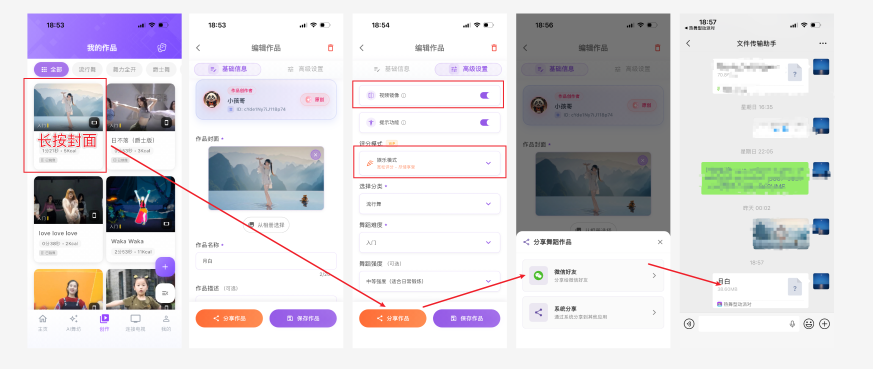
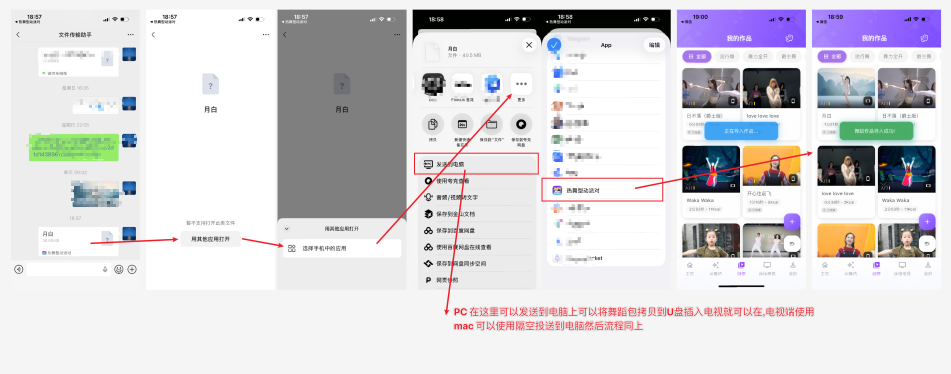
Once your dance package is ready, share it with students or family through WeChat. They can then import it into the app. Follow the prompts in your current app version.
Share to WeChat
In My creations (我的作品), touch and hold a cover, open the editor and choose Share.
Import a dance package from WeChat
Open the received file in WeChat and choose to open it with Keepdance Party.
Ready to create?
Open Keepdance Party and choose the video you’ve prepared.
06 / Try it on TV
Send your creations to your TV
After connecting your phone and TV, choose Upload in your mobile creation list. On TV, look under My DIY dances (我的 DIY 舞蹈). Depending on app support, you can also import .kdance files from a USB drive.
The original tutorial uses TV version 2.4.5 and mobile version 1.5.7. The interface and supported features depend on the versions you use.
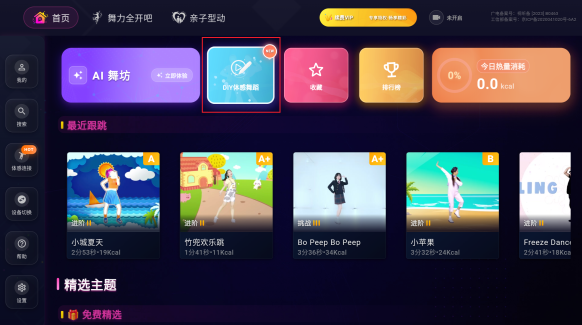
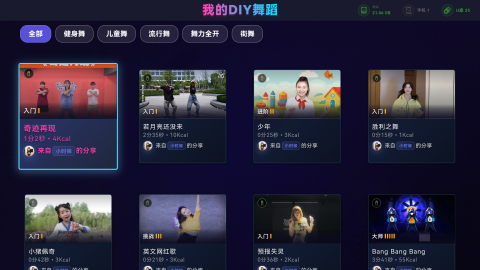
Import from a USB drive
- At the root of a USB drive, create a folder named
keepdanceand put the phone-generated.kdancedance packages in it. You can use one level of subfolders to organize them. - Connect the USB drive to your TV, open DIY motion dance (DIY 体感舞蹈) in the TV app and wait for the creations to load.
Use dance packages created by the mobile app, not ordinary video files. Follow the steps supported by your installed version.
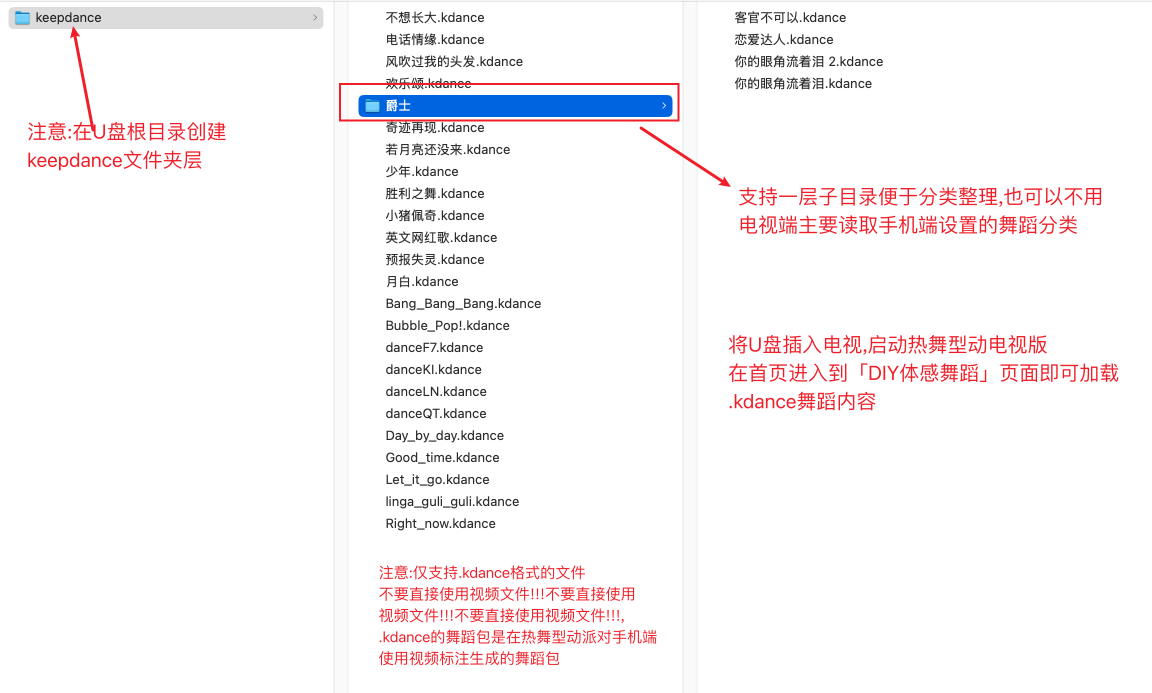
Original video: Chinese interface and/or captions. Follow the English steps alongside it.